BBC – A New TV Streaming Box?

The BBC’s Controller of Digital Transition, Helen Burrows, has confirmed that the corporation is “exploring the idea” of building its own UK set-top-box device to support the new broadband-based live TV streaming service, Freely, which until recently lacked any support among existing streaming boxes and sticks.

Article in ISPRewiew

Is the Beeb fed up with the slow progress of Freely, like its viewers?


Windows 11 ??

Microsoft is to stop support for Windows 10 late in 2025. If you are running Windows 10, you may wish to consider your options.

The big issue is that Win 11 needs newer hardware in order to be installed and cannot be installed on some older PCs running Win 10 satisfactorily. Win 11 compatibility can be tested by running the PC Health Check program supplied by Microsoft.


Options

If you can install Win 11 on your PC, my advice is to upgrade – unless you have a good reason not to upgrade to Win 11.

If the PC Health Check program says you cannot install Win 11, then you have several options:

  1. Stay on Win 10 – it won’t stop working and won’t be a security liability, just yet
  2. Change the operating system to Linux or ChromeOS – seek help if needed
  3. Install Win 11, bypassing the hardware checks – seek help if needed
  4. Buy a computer with Win 11 installed – it does not need to be a new computer

The last option is the only one to cost anything.


A faster computer

It is worth noting that older computers can be slower and a computer purchase (whether a new computer or a used computer) may well be faster and provide you a better user experience. Take care to ensure the computer you buy is going to give you the performance you expect.

Buying new or refurbished

Buying a used (renewed, refurbished) computer from eBay or similar, with Win 11 installed, is a viable option. It is recommended that your next computer has enough RAM and an SSD (solid-state drive) large enough for your needs – say 16GB RAM and 512GB SSD.
The speed of the CPU can be checked on the PassMark site. The larger the PassMark score, the faster the CPU – a PassMark of 5000 should be sufficient for most home computer users. You may find the CPU in your old computer has a PassMark score well below 2000, and therefore well worth updating to a faster computer. A suitable refurbished laptop can be found on eBay for about £300 – well under half the price of a new laptop.


Digital Switchover

What is the Digital Switchover?

It is the switching over of the ‘old’ analogue phone system, to a new digital system, using the internet – called Voice over Internet Protocol (VoIP).

Why is this happening?

It is a ‘Whole Industry’ change (not just BT) completing by January 2027.

Parts of the current system are over 100 years old and running out of spare parts – essentially, the old system is no longer sustainable.

What is involved?

Most people will just be able to unplug their landline from the old socket and plug it into their broadband router.

BT will give 4 weeks’ notice so that you can advise them of any issues you may have.

BT and Virgin Media advise that most handsets will still work. If you have a very old handset, contact them to check.

Potential issues/solutions

  • Your phone will no longer work if there is a power cut or if your broadband connection goes down. 
  • Most people will have a mobile phone that they can use as a backup.
  • If you do not have broadband then BT will fit it for you at no cost.
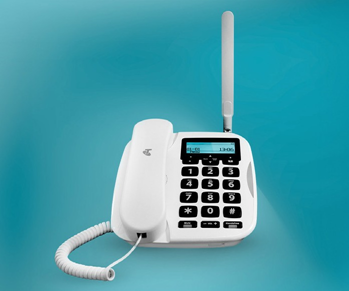
  • If you do not have a mobile phone, BT offer a hybrid phone – it has a battery and uses a mobile signal, in the case of a power cut.
  • If you do not have a mobile phone signal in your home, BT offers a ‘battery backup’ unit to keep your broadband and phone working.
  • Virgin Media offer an ‘emergency backup’ line (which includes a battery) if you are in an area with a mobile phone signal. If not, contact them.

People with Additional Needs

This category will include (but not be limited to):

  • Where people don’t have a mobile phone signal
  • Where people don’t have a mobile phone
  • Vulnerable people e.g. over 75’s or those with disabilities
  • Where people have a ‘telecare’ pendant alarm

Advise BT or Virgin Media and they will put back your switch date to allow time to sort out any issues*

BT Process

  • You will be contacted at least 4 weeks before the proposed switch. 
  • Let BT know if you have any additional needs or questions. 
  • Your switch date can be put back and a BT engineer will help get you set up. 
  • You will not be left without a phone connection.

The target end date is January 2027.

Virgin Media Process

  • Virgin Media will also contact you in advance by mail and email, but they do not give a timescale. 
  • Virgin Media will also delay people with additional needs and send an engineer to help them, as required.

MS Office vs. Google Workspace

Two office productivity suites reign supreme: Google Workspace (Google Docs) and Microsoft Office. But which one is the best tool for you?

Microsoft Office and Google Workspace/Docs have the same three core applications.

  • For word processing and text documents, you get Microsoft Word and Google Docs—the Docs name is often used when talking about all of Google’s office apps.
  • For presentations, you get Microsoft PowerPoint and Google Slides.
  • For spreadsheets, you get Microsoft Excel and Google Sheets.

You can access the web Office apps from onedrive.live.com, and Google’s apps can be used from drive.google.com. The mobile Office apps are bundled in one Microsoft 365 app for iPhone and Android. Google’s mobile apps for Docs, Sheets, Slides, and other tools are individual downloads on iPhone and Android.

The core functionality and interface between the office suites are mostly the same, especially since Microsoft has updated its Office apps over time to behave more like Google’s apps. For example, Word and Docs have a similar design, many of the same keyboard shortcuts, similar spell-check and grammar correction tools, and similar collaborative editing features.

Microsoft and Google both have desktop and mobile versions of all their office apps, so you can get work done from a desktop, tablet, laptop, phone, or anything else with a web browser. However, Microsoft also has native desktop applications for Word, Excel, and PowerPoint, available on Windows and Mac computers. The desktop applications predate the online Office apps, and they have more features than the web versions.

Microsoft’s Office apps are generally more feature-packed than Google’s apps, mostly because Microsoft had a massive head start and has continued to improve and add more functionality since then— Word’s first release was in 1983, and Google Docs first arrived in 2006. For example, some people prefer using Excel over Sheets because the latter is missing some math functions and the ability to install plugins that run locally on the computer. Google Workspace and Microsoft Office have the same core feature set, but Microsoft’s apps are undeniably more versatile.

There are a few other tools that are part of the core Microsoft 365 and Google Workspace packages. You get Google Drive and Microsoft OneDrive for cloud storage. Both services also have a feature for creating online forms that dump results into a spreadsheet.

There are some differences, though. Google doesn’t have an alternative to Microsoft OneNote, the desktop and mobile note-taking software—Google Keep is close, but it isn’t nearly as feature-packed as OneNote. The Google Drawings application for creating diagrams and charts doesn’t have a direct alternative in Microsoft’s app suite. The Outlook email client is usually considered part of Microsoft 365, but Google only has the web-based Gmail, which isn’t quite the same thing.

Microsoft and Google also have all the typical cloud productivity services, including email hosting, calendars, and contacts. If we were comparing the entire cloud ecosystems of Google and Microsoft, we’d be here all day, so we’re just sticking to the office suites.

What You Get for Free

The free version of Microsoft 365 gives you access to the web and mobile apps for Word, Excel, PowerPoint, OneDrive, and Outlook. There’s also 5GB of included cloud storage. You just need a free Microsoft account, and you’re ready.

The main catch is that you can’t create or edit documents on phones and small tablets (“devices with a screen size smaller than 25.5 cms,” according to Microsoft) unless you pay for a subscription. If you don’t pay up, you’re stuck with just viewing documents on mobile. Google’s apps don’t have this limitation.

Free Google accounts get access to all the Workspace apps and 15GB of cloud storage, shared across Drive, Photos, and Gmail. There are no limits on opening, editing, or creating documents on any device.

The Premium Pricing

There are two ways to buy the Microsoft Office apps. The best option for most people is a Microsoft 365 subscription, which starts at $69.99/year or $6.99/month (as of August 2024). The individual plan unlocks access to native desktop applications for Word, Excel, and PowerPoint, and unlocks premium features in Outlook, Editor, and a few other apps. You also get 1TB of cloud storage. A family plan is available for up to six people with more storage.

The other option is buying Microsoft Office 2021 (or Office 2024, when that arrives). It’s a one-time purchase that costs £150 (or less) and only includes the native desktop applications for Word, Excel, and PowerPoint. The apps do not receive feature updates like the subscription version, and the one-time purchase doesn’t unlock editing abilities in the mobile apps.

Google has a few different paid plans, which are mostly for adding more cloud storage, rather than unlocking features in the Workspace apps. The base plan bumps your cloud storage to 100GB for £2/month (as of August 2024), and additional plans are available for 2TB storage and access to Gemini AI features in Workspace apps.

You Can Use Both

Microsoft’s Office apps are packed with features, and desktop applications are more reliable in certain circumstances than any web app (especially when handling large files). However, the collaborative editing features aren’t as robust as Google Workspace, and you have to pay to unlock editing on mobile devices. The native desktop apps are also only available for Windows and Mac—sorry, Linux fans.

Google’s Workspace applications don’t offer native desktop applications, but the web apps work on all desktop platforms, and there are no viewing or editing restrictions in the mobile apps. The ability for multiple people to edit and collaborate on Docs, Sheets, and Slides is also still unmatched—Microsoft’s apps come close but still aren’t as good with live editing.

The good news is that it’s not too difficult to switch between office suites or use both for different projects. You can import Microsoft Office documents into Sheets, Docs, or Slides, and Google’s apps can export to Microsoft Office format. If you’re working on a group project, you can do the live collaborative editing in Google’s apps, then (if you want) move it to a Microsoft app for final edits. You can lose some formatting when converting formats, though.

There’s also a third option: LibreOffice.
The free and open-source office suite is cross-platform, with native apps available for Windows, Mac, Linux, and other operating systems. It can process Microsoft Office documents—either files created by Office apps or files exported from Google Workspace apps and other apps.

Both Google Workspace and Microsoft Office have free versions available, so you can try them out and see which tools work the best for you.


https://www.howtogeek.com/microsoft-office-vs-google-docs-sheets-slides


FTTP in Camberley

The internet network provider Openreach announced in May 2024 that the area served by the Camberley telephone exchange will be upgraded to support fibre-to-the-premises (FTTP) by the end of 2026.  FTTP uses fibre-optic cables to link to the exchange. FTTP will provide Gigabit internet service to both domestic and business users and provide users an alternative to toob and VirginMedia.

Until now, Openreach has only offered VDSL broadband to homes in the Camberley area (except for the town centre). VDSL is capable of delivering speeds of up to 80 Mbps, though many homes get rather less. VDSL uses the phone lines to connect the last section of the link to the exchange.

Openreach’s announcement comes late in the roll-out of Gigabit, whose goal is to provide Gigabit internet services to 85% of homes and businesses in the UK. FTTP offers higher reliability and much faster access to new digital services such as cloud file storage, TV streaming to multiple 4K screens and online gaming.

There are 3 network providers in the Camberley area.

  • Openreach (or BT) with services to every household and business in the area.
  • VirginMedia has offered cable or fibre internet services for many years. It has a fairly good coverage of the area.
  • Toob is a relative newcomer. Again it has fairly good coverage of the area but is still growing its network.

Neither of the newer providers offer services to every address in the area and many households need to rely on Openreach for internet connection.

Openreach sells its internet services via ISPs such as BT, EE, Sky, TalkTalk, Vodafone, Zen, etc.  In the future, you’ll be able to order gigabit-capable internet services from your choice of ISP and pricing is likely to be more competitive.  The change to FTTP is not an automatic upgrade, although some ISPs are doing free automatic upgrades as older copper-based services and lines are slowly withdrawn.

Typical prices are £35 pm for 500 Mbps.

Ispreview.co.uk

Openreach

The future of Satellite TV

  • TV Broadcasters are pushing towards an online-only (IPTV) future
  • Satellites used to carry Sky and Freesat service reach end of life at the end of the decade (by 2030)
  • Sky and Freesat gear up to migrate viewers to IPTV platforms

Satellites have a limited lifespan

  • Three satellites currently provide TV and radio services available on Sky and Freesat in the UK and Ireland. They are Astra 2E, 2F and 2G
  • The satellites were built with a lifespan of 15 years of service and are operated by Luxembourg-based SES
  • Astra 2E, 2F and 2G are the second generation of satellites to supply digital satellite TV services to audiences here
  • Astra 2E, 2F and 2G were launched between 2012 and 2014 and they are due to go out of service by 2029

Could Sky really migrate all of its subscribers away from satellite in just five years?

It’s been done before. Sky previously moved viewers from its analogue to digital satellite service in just a three year period between 1998 and 2001. That required new equipment and new dishes for each of its subscribers.

Sky Q users can expect their TV service to continue in its current form for a few more years. However, Sky is introducing new features to its latest receivers only, although Sky Q remains well supported for existing customers. Already, a lot of Sky Q’s extra functionality relies on an internet connection.

Sky does not sell SkyQ to new customers but offers Sky Glass or Sky Stream. However, Sky has signed a satellite deal lasting to the end of the twenties. This would indicate Sky will support Sky Q customers until then.

Sky offers the Sky Stream puck which will connect to a household’s existing internet connection. It can be used in conjunction with any Internet Service Provider. Viewers also have the option of getting a Sky Glass TV, with Sky’s internet based TV service built in.

Could Freesat really migrate all of its users before satellite TV switch-off?

Later in 2024, Freely will begin to replace Freesat. All new receivers will be a hybrid that can receive traditional broadcast services and IP-delivered online services. The receiver can be programmed to automatically default to an IP-stream of a channel in place of the satellite signal. Therefore, once satellite services expire, Freely receivers will seamlessly continue receiving services online.

Unlike Sky Glass and Sky Stream, Freely receivers won’t have the initial problem of viewers missing channels they could receive on satellite. Freely receivers with satellite capability will continue to receive satellite-only services as well as IP-streaming channels.

Existing Freesat receivers will gradually receive fewer and fewer services until the final services eventually leave satellite. But this won’t happen until at least the end of the decade.

https://rxtvinfo.com/2024/how-soon-is-satellite-tv-switch-off/

March 2024

TV Streaming

Back in September 2023, the UK’s biggest free-to-air Public Service Broadcasters (PSBs) – the BBC, ITV, Channel 4, and Channel 5 – announced a new smart TV streaming service that will allow users to watch live TV via the internet (IPTV) for free. The platform, called Freely, is expected to arrive soon in Q2 2024. More news here.

Freely is designed to bridge the gap between conventional terrestrial television and online entertainment by offering live free-to-air TV without the need for an aerial.

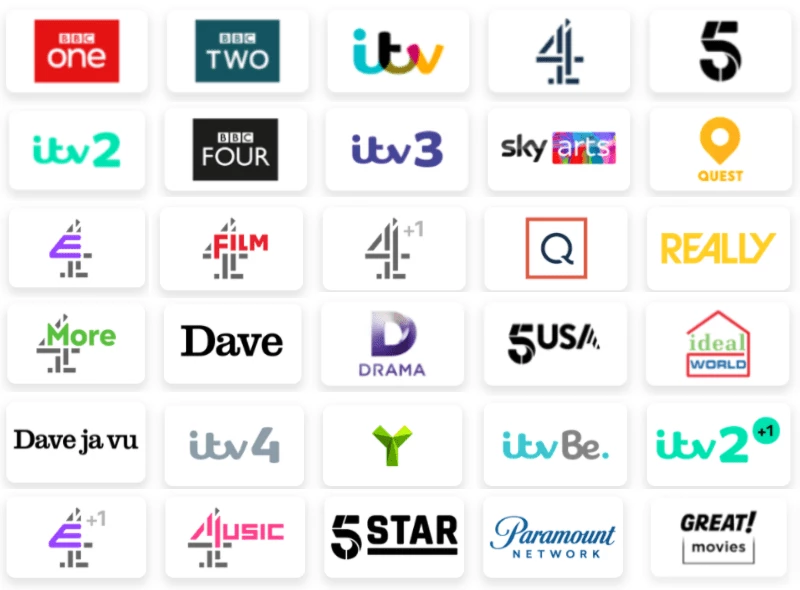
Freely will complement iPlayer, itvX, More4 and My5 and will allow users to watch live IPTV from these PSBs through a single application, without having to swap between apps when they switch from channel to channel. Freely will initially be available only on some new smart TV sets.

The implication is that it will be necessary to buy a new smart TV to get the Freely service. This is a big expense for most households and may not attract many Freely users.


In August 2025, Freely announced a partnership with Netgem to produce a simple and affordable plug-in puck to run Freely. There are very few details yet, but the device will have only internet input (no aerial input) and no recording capability.

In November 2025, the Netgem PLEIO puck was previewed. The Netgem Pleio (pronounced Play-Oh) is available now on Amazon for ~£100.


The streaming-only approach represents a clear statement about the direction the industry is heading. With the government pushing for an IP switchover in the 2030s and research suggesting 70% of UK homes will ditch aerials by 2040, the Freely box represents a glimpse of that future.

What users want is for Freely to become available on other devices, like Fire TV and Roku sticks. Ideally, Freely would be available on all devices that run Freeview.


Review in Mirror

Future of TV distribution


WiFi-5, WiFi-6, WiFi-7

There is a lot of chatter about WiFi-5, WiFi-6 and the new WiFi-7

I found this simple chart to outline the technology standards

https://www.truecable.com/blogs/cable-academy/wifi-7-vs-wifi-6-whats-the-difference

The peak speed and the actual speed obtained are very different measures. WiFi-6 should deliver gigabit speeds for faster applications. The higher frequency bands (5 and 6 GHz) don’t pass through brick walls easily.

For an explanation of some of the terms used – click here


Email Challenges when Changing ISP

with thanks to the ZZOOMM website

Internet Service Provider Email Accounts

Many broadband services come with a free email address when you sign up. This service addition can create a dilemma when it comes to switching ISPs (Internet Service Providers). Our email accounts are used not just for communication, but commonly to store important information with the companies we have a relationship with.

That means changing an ISP-provided email address can sometimes be considered a barrier to switching to a faster, better AltNet ISP (such as Zzoomm).

The good news is that it needn’t be! You don’t have to lose your email account or your data. Most broadband companies will allow you to switch and keep your email address, although some may charge you a fee for doing so and some may restrict access to it via a web client.

This section takes a look at the various ISP variations and what you need to know about the email addresses provided if you’re planning to switch ISP’s.

At the core of the matter is the question, can you keep your provider-linked email address? The short answer is yes, sometimes — but the real question is, should you?

Keeping your email address when you switch broadband providers

Not all providers will allow you to keep your email address once you switch. For example, the Post Office and Virgin Media will delete your email account once you’ve left.

However, a number of other providers allow you to retain access to your email address for a monthly fee. These fees aren’t fixed by external governing bodies so can be very expensive.


Specific Supplier Examples

Can I keep my email address if I leave BT for Zzoomm?

You can still access your BT email address for 60 days after you switch to a different broadband provider. After that, you’ll have to subscribe to BTs Premium Mail service to retain access. As the name suggests, you’ll need to pay a monthly fee, currently £5 each month for the account. Switching is relatively simple and BT will automatically move your accounts across for you.

I’m switching from Plusnet to Zzoomm, will I lose my Plusnet email account?

If you switch from Plusnet to another provider, you can take your email account with you. Like BT and others, the company will charge a monthly fee and will migrate the account and all emails for you.

Can I ditch Sky to get Zzoomming and keep my email address?

Sky has switched to Sky Yahoo! Mail, which the company claims means you have an “email for life”. It is essentially the free Yahoo! Mail but with Sky branding. That means if you switch from Sky, you’ll be able to keep your email address, and with it all the messages and data you’ve stored in your account. Sky does reserve the right to delete an account if you haven’t used it for 180 days. If Sky closes a “dormant” account, you’ll lose any associated data and content.

I want to switch to Zzoomm from TalkTalk, can I keep my TalkTalk email account?

All TalkTalk broadband customers have TalkTalk Mail included in their package. Should you leave TalkTalk, you can subscribe to TalkTalk Mail Plus and keep your email address, currently for £5 per month or £50 per year. Otherwise, you’ll see your functionality reduce 30 days after you leave, and after 5 months TalkTalk will delete it.

Can I switch from Virgin Broadband to Zzoomm and keep my email account?

Once you give notice to Virgin Media, you’ll have 90 days before your email address is cancelled. After that, Virgin Media will clear out your emails, delete all data associated with your account and shut it down.

You may be with an ISP that we haven’t listed here so the best thing for you to do is contact them directly and ask if you can keep your email address when you switch to Zzoomm.


What’s an alternative: Why not get a free email account that is not tied to a provider?

You don’t need to be tied to any broadband provider with your email account. You can make the switch to a free webmail account. While it might be a hassle in the short term, it will give you the freedom to switch pain-free for years to come.

There are several options available including:-

  • Apple iCloud,
  • Google’s Gmail,
  • Microsoft Outlook (formerly Hotmail) and
  • Yahoo! Mail.

The choice you make may depend on the types of devices you have (if you’re using an iPhone versus an Android-Google phone, for example, or if you use a PC or laptop for email).

You may wish to take this opportunity to consider having several new email accounts –

  • one for social media,
  • one for business,
  • one for family,
  • one for banking and
  • one for online shopping accounts.

It’s also worth bearing in mind that the storage capacity for each may vary, although some will allow you to pay a monthly subscription to increase storage.


Moving your email to Gmail

Visit gmail.com and follow the on-screen instructions. Once you have set up your Gmail account click on the settings menu, (the cog icon in the top right corner).

Click ‘Accounts and Import’ and then ‘Import mail and contacts’.

You’ll need to enter your email address here and follow the on-screen instructions.

Don’t Lose An Address

Once your new email is set up, it’s a good idea to export your contacts from your old account, if you set up a Gmail account you can follow the instructions above. It’s also a good idea to send out an email to your main contacts to let them know you’ll be using a new address from now on.

Forward Your History

Setting up a forwarding system in your old account while you are in transition is worth considering. New emails are automatically forwarded to your new email address, which may seem tricky but is usually found in your inbox settings. This means for new mail you only need to manage one mailbox.

For example, with BT Connect, you would navigate to ‘Manage Services -> Email Summary -> highlight your email address in the box -> click ‘Email Forwarding’.

Enter your new Gmail address and click ‘Save’.

Make a Clean Break

To keep your information secure, it is good practice to delete all your old emails. Then create a new password to ensure that the old account stays secure until it’s finally closed down. It’s best to set up your new email account with your new provider using a new password too.

Set up an auto-responder

If your email service supports this, you might also want to set up an auto-responder for your old email address that lets anyone who contacts you know that their email has been forwarded to a new address.


Update accounts linked to your old email address

Depending on how long you’ve had your email address, you may have a lot of additional services linked to this address. Be sure to update as many of your login details as possible while you still have access to your old provider-linked address as you may need to reconfirm the new details and in situations where you forget your login, the reminder email will be sent to an old address if not updated.

Here’s an example checklist of the most common things we would need to update ourselves – for instance:

  • Streaming services
  • Energy and household bill payments
  • Online banking
  • Online payments
  • Social media accounts
  • Cloud storage
  • Gaming accounts
  • Work systems
  • Cloud tools


Boost your Wi-Fi

If you’re hitting your internet providers top speeds, but things still aren’t fast enough for you, upgrading your internet service might be your best bet. However, if you test your connection and see you’re nowhere near the speeds of which your broadband should be capable, you don’t always need to pay to improve your performance. There are ways to boost your wifi performance absolutely free.
Are there paid solutions to your wifi problems? Absolutely. You can throw more money at your ISP, or you can buy a new and improved router. Of course, those methods will cost you, so first you should see if you can speed up your digital life without spending a fortune.

Move your router into an open space

One of the best things you can do for your wifi performance is to move your router out in the open. It’s tempting to hide the router away somewhere no one will see, since who wants to stare at a boring, blinking box? But, the truth is, your devices want to be free. Your router is responsible for sending out your wifi signal, and that signal is only as good as its environment; if it runs to any interference, the signal isn’t as effective. Interference can come from physical elements in your home like walls and doors, or other electronic signals coming from devices like microwaves and wireless phones.
Keeping that in mind, try to move your router somewhere free from those types of interferences. If you can elevate the router, such as putting it on an open shelf, all the better. As a result, your connected devices will receive a stronger signal than they would if your router was hidden behind walls, doors, and microwaves.

Stay close to the router

In a similar vein, try to use your devices as close to your router as possible. There’s no need to sit directly next to your router on your laptop or force your PlayStation and router to be attached at the hip, but if you’re looking for your wifi signal to be the best it can be, you’ll want to stay within sight

Too many devices on the network?

You might be used to doing a lot on the internet at once, like streaming a 4K show on Netflix while playing games online with your friends, all the while downloading a series to your iPad. All this multitasking is wonderful, but it puts a strain on your overall internet speeds.
If you’re looking to boost wifi speeds and performance for something in particular, say to download a file as fast as possible, you don’t want other internet-intensive tasks running in tandem. For these times, make every effort to pause those other tasks. If you live with other people, that might involve politely asking friends and family to pause their favourite TV shows for a while.

How fast can I expect my WiFi to be?

Firstly, your WiFi speed cannot exceed the speed of your internet connection.
Secondly, the speed you get depends on several factors. One of these is the WiFi technology your router and connected devices employ. The WiFi standard is known as 802.11 with various versions (a, b, g, n, ac, etc). Examine your router to see what standard it supports. WiFi also uses 2.4GHz and/or 5 GHz radio frequency bands.

2.4 GHzTheoretical SpeedReal-World Speed
802.11b11 Mbps2-3 Mbps
802.11g54 Mbps10-29 Mbps
802.11n300 Mpbs150 Mbps
5 GHzTheoretical SpeedReal-World Speed
802.11a6-54 Mbps3-32 Mbps
802.11ac433 Mbps – 1.7 Gbps210 Mbps – 1 Gbps
802.11n900 Mbps450 Mbps
The old classic, turn-the-router-off-and-on-again 

Routers follow the same rules that all electronics do: If something’s wrong, turn it off and on again. If your internet is acting up and you’re not sure why, toggling the power on your router is one way to get things back to where they should be. However, if you find yourself doing this too often, you might want to find the underlying cause of the problem.

Is there a better DNS?

DNS, or Domain Name System, is commonly referred to as the internet’s phone book. When you visit a website, your device goes through a DNS lookup to confirm the site it’s trying to reach. After all, your computer needs to know the website’s IP address, not the name itself. This lookup communicates with a database to see if your entry’s IP address is listed. If not, the search goes out to a larger pool of databases and the end result is sent back, allowing you to connect to the site. If you’ve never tinkered with your internet setup before, you’re likely using your ISP’s DNS, which is usually slower than it needs to be. Luckily, it’s not terribly difficult to switch to a better DNS.
There are lots of good DNS – most are better than your ISP’s DNS.  Search on Google for ‘free public DNS’. Some of these prevent access to malicious, phishing and adult sites and some provide ad-blocking.

ProviderPrimary DNSSecondary DNS
Google8.8.8.88.8.4.4
Quad99.9.9.9149.112.112.112
OpenDNS208.67.222.222208.67.220.220
Cloudflare1.1.1.11.0.0.1
CleanBrowsing185.228.168.9185.228.169.9
Alternate DNS76.76.19.1976.223.122.150
AdGuard DNS94.140.14.1494.140.15.15

as at Feb 2022

If you are using IPv6 then you may need to know the IPv6 addresses for the DNS servers.

Thanks to LifeHacker